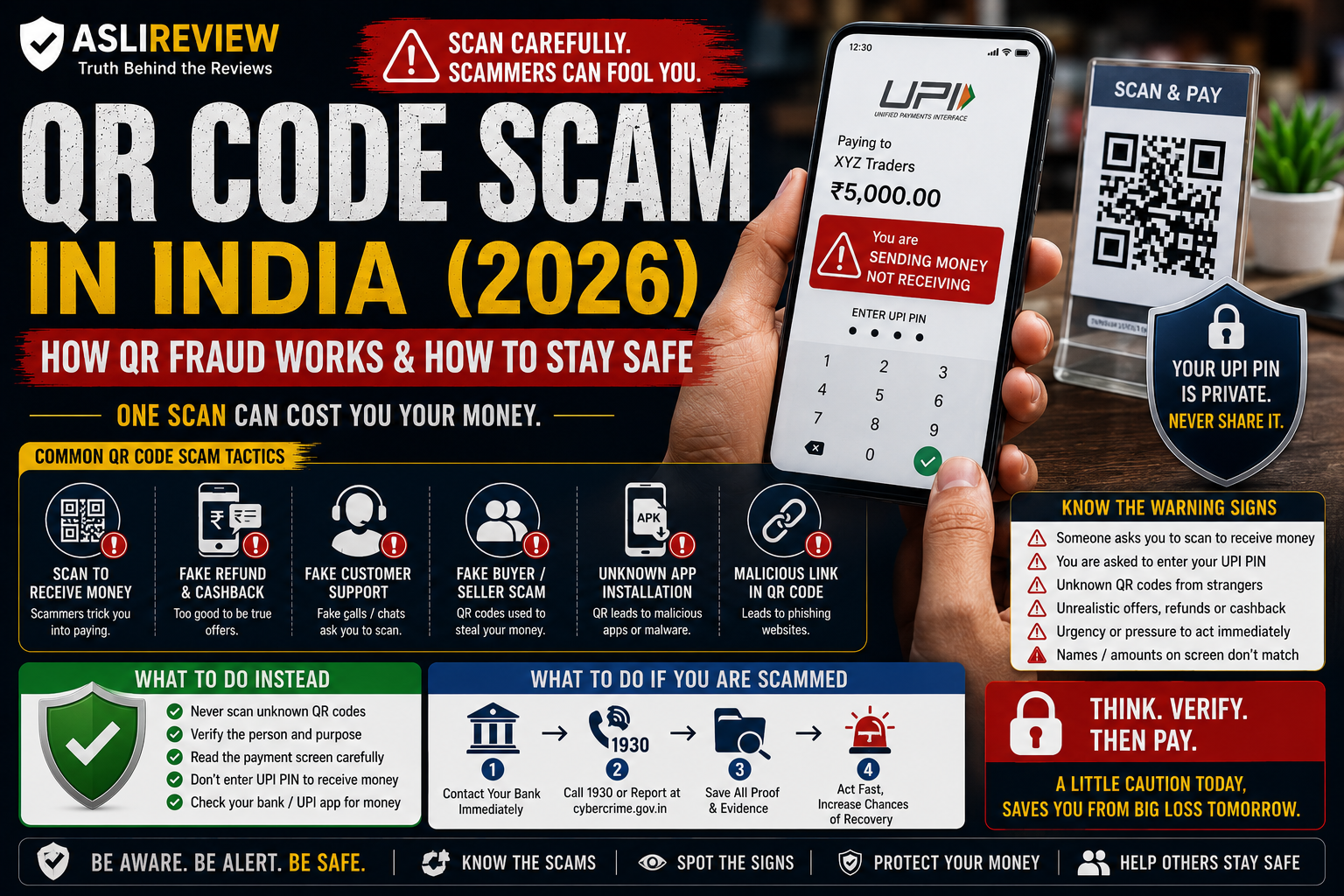
Part 6: QR Code Scam in India (2026): How QR Fraud Works and How to Stay Safe
By AsliReview Team · 14 August 2026
QR codes are everywhere in India. You see them at shops, restaurants, parking areas, ticket counters, websites, advertisements and payment counters. They have made digital payments incredibly convenient.
But scammers have also learned how to use people's familiarity with QR codes against them.
A fraudster may tell you "scan this QR code and you will receive the money," or "scan this code to get your refund," or "scan this to verify your account."
The QR code itself is not necessarily malicious. The danger comes from what the QR code is designed to make you do next.
If scanning the code opens a payment screen and you are asked to enter your UPI PIN, you may be authorizing money to leave your account.
The Reserve Bank of India specifically warns consumers not to scan QR codes received from unknown sources and states that entering a PIN or OTP is not required to receive money.
NPCI gives similar guidance: scanning a QR code and entering a UPI PIN is intended for making payments, not receiving them. That simple distinction can prevent a lot of trouble.
🚨 Fraud Snapshot
Category
Digital Payment Fraud
Risk Level
🔴 High
Common Targets
UPI users, online buyers and sellers, small businesses, senior citizens
Common Channels
WhatsApp, SMS, phone calls, social media, marketplaces, fake websites
Common Tactics
Fake QR codes, payment requests, refund scams, fake buyers, fake customer support
Difficulty to Identify
Medium
Potential Loss
Can range from a small payment to a substantial financial loss
Best Protection
Understand what the payment screen is asking you to authorize
What Is a QR Code Scam?
A QR code scam is a fraud in which criminals use a QR code to manipulate someone into making an unauthorized payment, visiting a malicious website, downloading something harmful, or revealing sensitive information.
Not every QR code is dangerous. In fact, legitimate QR codes are a normal part of digital payments.
The scam usually begins with deception. The fraudster creates a believable reason for you to scan the code — "this is your refund," "this is your cashback," "scan this to receive your money," "scan this to verify your account."
The story sounds reasonable. The transaction screen tells a different story. And that is where you need to pay attention.
The Most Important Thing to Understand
A QR Code Does Not Automatically Mean You Are Receiving Money
This is one of the biggest misconceptions scammers exploit.
Suppose someone says "I am sending ₹10,000 to you. Just scan this QR code and enter your PIN." You scan it. Your UPI app opens. The screen says Pay ₹10,000 to XYZ. That is not a receipt — you are being asked to make a payment.
RBI's consumer-awareness guidance specifically says that receiving money does not require scanning a QR code or entering a PIN/OTP.
💡 AsliReview Rule
If someone says you need to enter your UPI PIN to receive money, stop. Read the payment screen before doing anything else.
How Does a QR Code Scam Work?
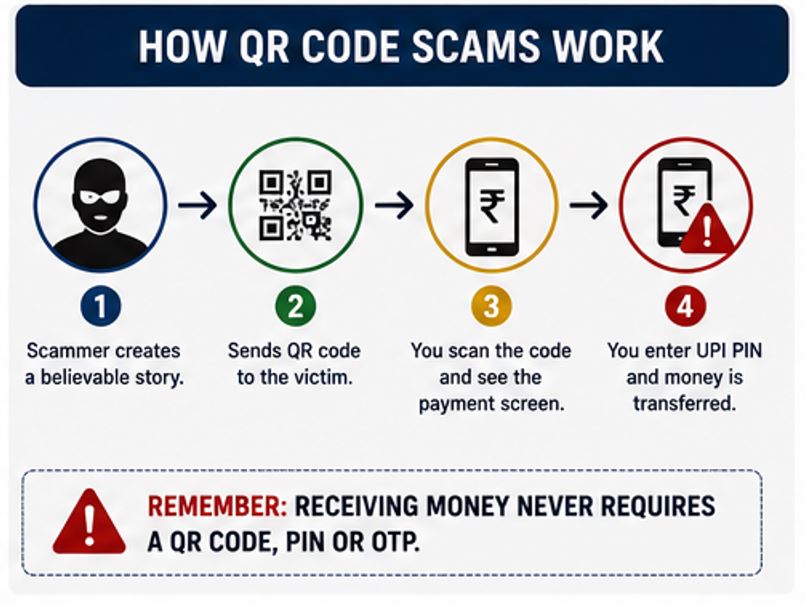
Aslireview_QR_Code_Scam_Works
Most QR scams follow a simple psychological pattern.
Step 1: The Scammer Creates a Reason
The scammer needs you to believe that scanning the QR code is necessary — a payment, refund, cashback, verification, advance payment, delivery confirmation, or account update.
Step 2: They Create Urgency
You may be told "do it now," "the request will expire," "your refund is waiting," or "the buyer is waiting." The purpose is to reduce the time you have to think.
Step 3: You Scan the QR Code
Your payment application opens. At this point, many people assume "the other person told me this is for receiving money, so it must be a receiving transaction." That assumption can be dangerous.
Step 4: The Payment Screen Appears
This is the moment that matters most. Look carefully at the recipient name, UPI ID, amount, transaction type, and payment description.
Step 5: The Victim Authorizes the Transaction
If you enter your UPI PIN and approve the payment, you may have authorized money to leave your account. The scammer's deception has done the difficult part — you have unknowingly completed the transaction yourself.
What Happened?
Rahul lists his old laptop for ₹35,000. A buyer contacts him through a messaging app and immediately agrees to purchase it, saying "I am transferring ₹5,000 as an advance." A few seconds later, the buyer sends a QR code and says "scan this and enter your UPI PIN. The advance will come into your account."
Rahul scans the code. His UPI app opens. The screen shows Pay ₹5,000. He doesn't notice the word "Pay." He enters his UPI PIN. ₹5,000 leaves his account.
The buyer then says "oops, that didn't work. Try this second QR code." Rahul now has another decision to make — this is where a scam can escalate.
The problem wasn't that Rahul used UPI. The problem was that he trusted the story instead of checking what the payment screen actually said.
⚠️ Warning Signs to Watch For
Someone says "scan to receive money" — RBI explicitly advises consumers that receiving money does not require scanning a QR code or entering a PIN/OTP
You are asked for your UPI PIN — someone sending money to you should not need your UPI PIN; NPCI advises users not to share their UPI PIN
You are being rushed — phrases like "do it immediately," "the payment expires in two minutes," or "your account will be blocked" are manipulation techniques
The name on the payment screen doesn't match what you were told — don't assume the name is irrelevant
Someone sends you a QR code without you asking for it, especially through WhatsApp, Telegram, SMS, social media, or email
You are asked to install an app — do not install unknown applications simply because someone asks you to
What to Do Instead
If someone says they are sending you money, don't follow their instructions blindly. Instead:
Open your own UPI application
Check whether money has actually arrived
Check your bank account or transaction history
Don't scan an unexpected QR code
Don't enter your UPI PIN to "receive" money
You don't need complicated technical knowledge.
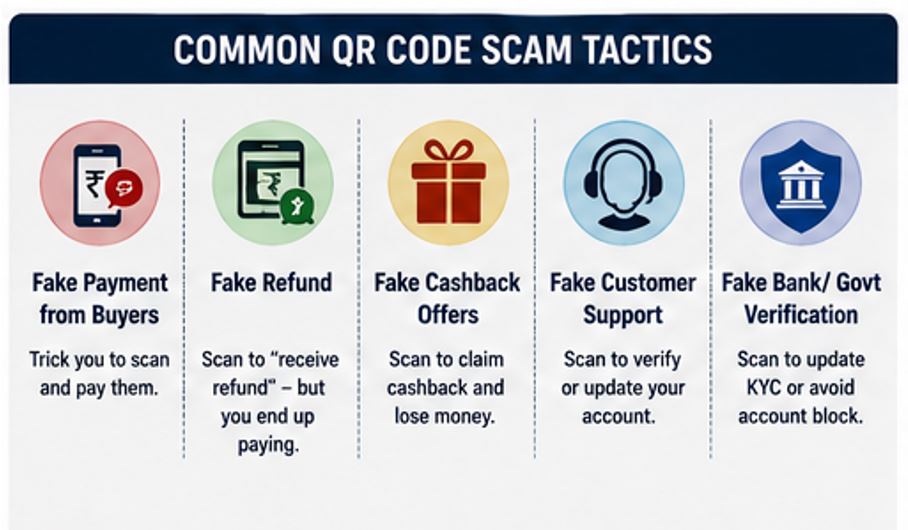
Aslireview_QR_Scam_Tactics
QR Code Scam on Online Marketplaces
Online marketplaces are particularly attractive to scammers because buyers and sellers frequently interact with strangers.
The fake buyer scam: a fake buyer says "I'll pay you through UPI," then sends a QR code, a collect request, a payment link, or a fake payment screenshot. The objective is to convince you that you need to approve something.
The fake seller scam: a scammer advertises a product at an attractive price. Once you contact them, they say "pay ₹2,000 advance to reserve it," send a QR code, you pay, and the seller disappears.
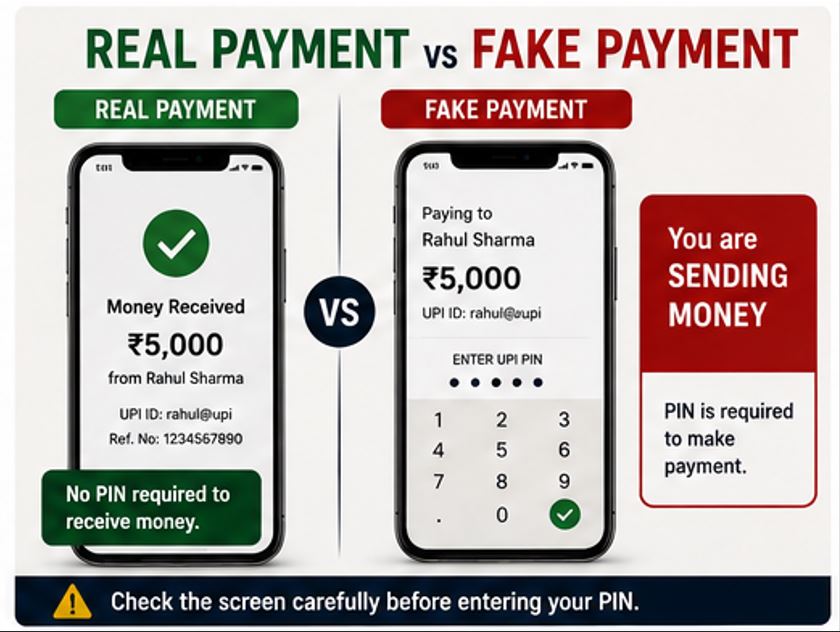
Aslireview_RealvsFake
⚠️ Warning Signs
Price is unusually low
Seller refuses platform-protected payment options
Buyer insists on moving the conversation to WhatsApp
Someone sends a QR code unexpectedly
You're pressured to pay immediately
Payment is requested before basic verification
The person refuses to provide verifiable business details
QR Code Scam Through Fake Customer Support
Imagine your online order is delayed. You search for customer support online and find a phone number that appears legitimate. You call. The person says "I'll process your refund. Please scan this QR code." The QR code opens a payment request. You are told "don't worry, this is just for verification." You enter your PIN. Money leaves your account.
Always obtain customer-support details through the company's official website, the official mobile application, your original order confirmation, or a verified customer-support channel. Don't assume the first phone number you find online belongs to the company.
NPCI specifically warns about fraudsters exploiting people who search online for help and then contact fraudulent numbers or accounts.
QR Code Scam Through Fake Cashback
You receive a message: "Congratulations! You have won ₹2,500 cashback." A QR code is attached with instructions to "scan now to claim your cashback." You scan it, your UPI app opens, and the screen asks you to authorize a payment. That's your warning.
NPCI explicitly identifies fake cashback links and QR-code-based schemes as fraud patterns users should watch for.
Fake Refund QR Code
Refund scams can be particularly convincing because the victim may already be expecting money — "your order refund has been approved, scan this QR code to receive your refund." But a genuine refund should not require you to send money to the person processing the refund.
💡 AsliReview Tip
If you are expecting a refund, verify its status directly through the merchant's official website or application. Don't process a refund through instructions sent by an unknown person over WhatsApp or a random phone call.
Fake Government or Bank Verification QR Code
Scammers may also use authority — claiming to be from a bank, government department, police, tax department, courier company, or telecom company. They may say "your account needs verification" or "scan this QR code to update your account."
Don't let the authority of the claimed organization replace verification. Contact the organization through its official channel.
❌ Common Mistakes People Make
Trusting the person instead of the screen — if the person says you're receiving money but the screen says "Pay ₹5,000," believe the screen and stop the transaction
Assuming every QR code is safe — a QR code can direct you to different destinations or initiate different actions
Entering the PIN automatically — the PIN is the final authorization step; treat it seriously
Trusting screenshots — a screenshot saying "Payment Successful" doesn't prove money reached your account
Acting because someone sounds professional — knowing your name, order number, or phone number doesn't automatically prove they're genuine
🔍 How to Verify a QR Payment
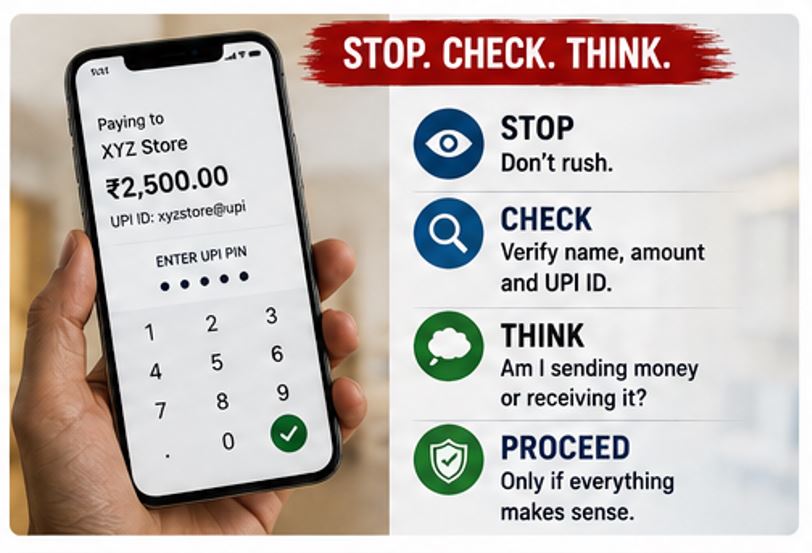
Use the STOP method:
S — Stop. Don't act immediately.
T — Track the transaction. Look at the recipient, UPI ID, amount, and payment description.
O — Observe the direction. Is money coming into your account or leaving it?
P — Proceed only if everything makes sense. If something doesn't match the explanation you were given, cancel.
Example: Someone says "I'm sending ₹3,000 to you." You scan the QR code. Your screen says "Pay ₹3,000 to ABC Traders." STOP. The explanation and the transaction don't match. Don't enter the PIN.
📌 Reality Check
Myth: QR codes are dangerous, so I should never use them.
Reality: QR codes are a legitimate technology widely used for genuine digital payments. The danger comes from what a QR code is being used to make you do, and whether you understand the transaction before authorizing it. The goal is not to fear every QR code — the goal is to avoid blindly approving transactions.
Myth: If someone knows my UPI ID, they can directly empty my account.
Reality: Knowing a UPI ID alone does not mean someone can simply withdraw all your money. The bigger risk in many QR scams is social engineering — convincing you to approve a payment or disclose sensitive credentials.
What If You Already Scanned the QR Code?
Don't panic. Scanning a QR code by itself does not automatically mean that money has been lost. What matters is what happened after the scan.
Check whether a payment was initiated, whether you entered your UPI PIN, whether any money was debited, whether an unknown application was downloaded, or whether a suspicious website opened. If nothing happened, close the page or application and don't continue interacting with the sender.
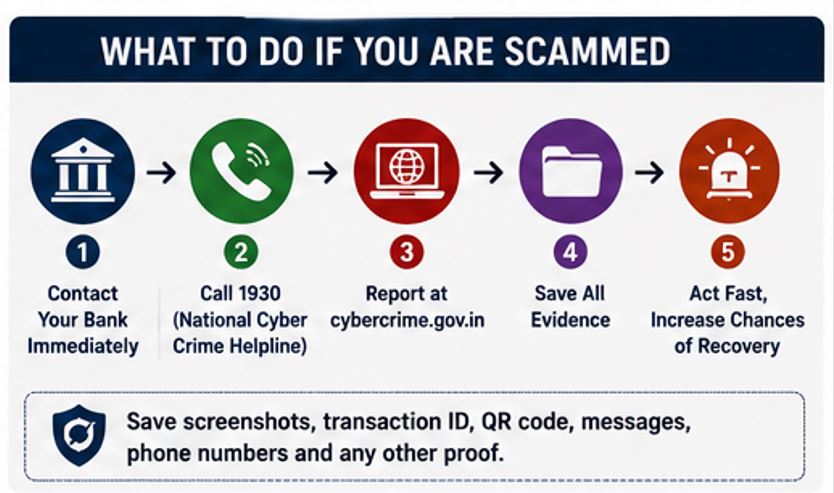
What If Money Has Already Been Debited?
Aslireview_WhatIfScammed
Act immediately.
Step 1: Contact Your Bank
Inform your bank or payment provider about the unauthorized transaction as soon as possible. RBI requires banks to provide channels for reporting unauthorized electronic transactions and says banks should take immediate steps to prevent further unauthorized transactions after receiving a report.
Step 2: Call 1930
For financial cyber fraud in India, the National Cyber Crime Reporting Portal lists 1930 as the national helpline for immediate reporting.
Step 3: Report Online
You can also report the incident through the National Cyber Crime Reporting Portal. The portal currently provides a dedicated Financial Fraud reporting option.
Step 4: Preserve Evidence
Don't delete the conversation. Save the QR code, screenshots, UPI transaction ID, UPI ID, phone number, WhatsApp messages, SMS, email, payment confirmation, website or payment link, and bank notification. These details can be useful when reporting the incident.
Can You Get Your Money Back?
There is no automatic guarantee that money lost through a QR scam will be recovered. However, reporting quickly matters.
RBI's framework for unauthorized electronic banking transactions places significant importance on how quickly a customer reports the unauthorized transaction. In certain third-party-breach circumstances, reporting within three working days can result in zero customer liability, subject to applicable conditions. Customer negligence, such as sharing payment credentials, can affect liability.
So don't wait — if money has been fraudulently debited, act now.
💡 AsliReview Tip
Don't memorize complicated cybersecurity rules. Remember just this: a QR code is a payment tool, not a magic "receive money" button.
Aslireview_Stop_Check_Think
Whenever someone tells you to scan a QR code: stop, read, verify, then decide. If the transaction doesn't make sense, don't approve it.
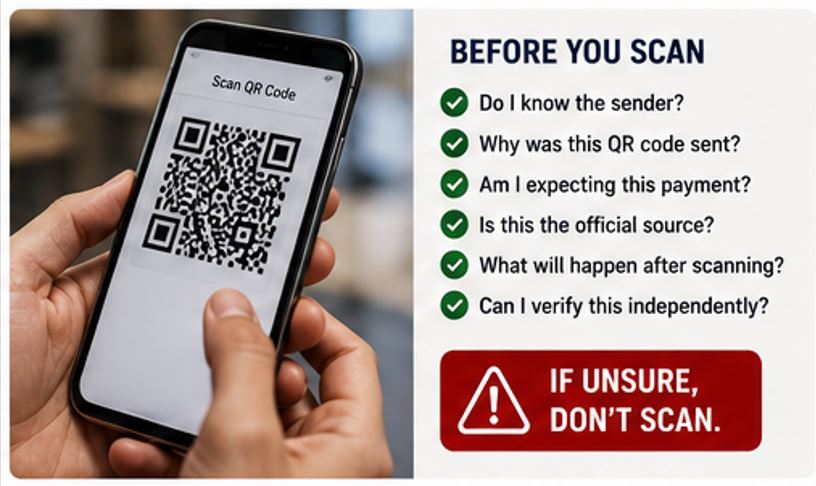
🛡 Quick QR Code Safety Checklist
Before scanning a QR code connected to money, ask yourself:
Aslireview_BeforeYouScan
Did I expect this QR code?
Do I know who sent it?
Am I actually receiving money?
Does the payment screen show "Pay" or another action?
Is the recipient's name correct?
Is the amount correct?
Did I initiate this transaction?
Am I being pressured to act immediately?
Is someone asking for my UPI PIN?
Is someone asking for an OTP?
Is someone asking me to install an app?
Can I independently verify the request?
If even one answer makes you uncomfortable, stop before entering your PIN.
Frequently Asked Questions
Can scanning a QR code steal money?
Scanning a QR code does not automatically mean money will be stolen. The risk depends on what the QR code leads to or initiates and what actions you take afterward. A QR code can be used to initiate a payment, and if you authorize that payment with your UPI PIN, money may leave your account. RBI specifically warns consumers to be cautious with QR codes from unknown sources.
Is it safe to scan a QR code to receive money?
Be extremely cautious. A legitimate payment received into your account does not require you to enter your UPI PIN or OTP. RBI explicitly states that entering a PIN or OTP is not required to receive money.
Do I need my UPI PIN to receive money?
No. Your UPI PIN is used to authenticate payments. NPCI advises users not to share their UPI PIN and explains that entering it after scanning a QR code is associated with making a payment, not receiving one.
What should I do if someone sends me a QR code on WhatsApp?
Don't scan it automatically. First determine who sent it, why they sent it, and what transaction it's supposed to perform. If you're being told to scan it to receive money, treat that as a major warning sign.
Can a QR code contain a virus?
A QR code itself isn't necessarily a virus. However, a QR code can direct you to a website, application, payment request or other destination, and that destination may be malicious or fraudulent. Treat unknown QR codes carefully.
Is a QR code from a shop always safe?
No technology should be treated as automatically safe simply because it is displayed at a physical location. For a payment, check the recipient name and amount shown in your payment application before authorizing the transaction.
What if someone says the QR code is required for a refund?
Don't assume that's true. Contact the merchant through its official website or application and verify the refund independently. A stranger's QR code should not be treated as an official refund mechanism.
Can someone empty my bank account with only my QR code?
A QR code by itself does not mean someone automatically has unrestricted access to your bank account. The more common risk is that a scammer uses the QR code as part of a social-engineering process to get you to authorize a payment or reveal sensitive information.
I scanned a suspicious QR code but didn't enter my PIN. What should I do?
Don't panic. Check whether any payment was initiated or any money was debited. If nothing happened, close the page or app and avoid interacting further with the sender. If you entered sensitive information or installed an unknown application, take additional account-security steps.
What should I do if money was deducted after scanning a QR code?
Contact your bank immediately. Then report the financial cyber fraud through 1930 and the National Cyber Crime Reporting Portal. Preserve the transaction details, QR code, messages and screenshots.
Where can I report a QR code scam in India?
For financial cyber fraud, you can call 1930 and report the incident through the National Cyber Crime Reporting Portal. The portal also provides facilities for reporting suspicious cybercrime identifiers.
Related AsliReview Guides
This article is part of AsliReview's fraud awareness series. Read our companion guide on UPI Fraud in India, along with upcoming articles on fake customer care scams, online marketplace scams, fake cashback scams, fake refund scams, digital arrest scams, fake shopping websites, and investment scams.
Final Word
QR codes were designed to make life easier. That's exactly why they work so well as a tool for social engineering.
People see a QR code and think "scan it." Scammers want you to stop thinking at that point.
Don't. Look at the screen. Check the recipient. Check the amount. Understand what you're authorizing.
And most importantly: never enter your UPI PIN just because someone tells you that doing so will help you receive money.
RBI and NPCI have both issued clear warnings around this exact type of fraud.
If money has already been lost, don't waste time feeling embarrassed. Contact your bank immediately and report financial cyber fraud through 1930 and the National Cyber Crime Reporting Portal.
The best time to stop a QR scam is before you enter the PIN. The second-best time is right now.
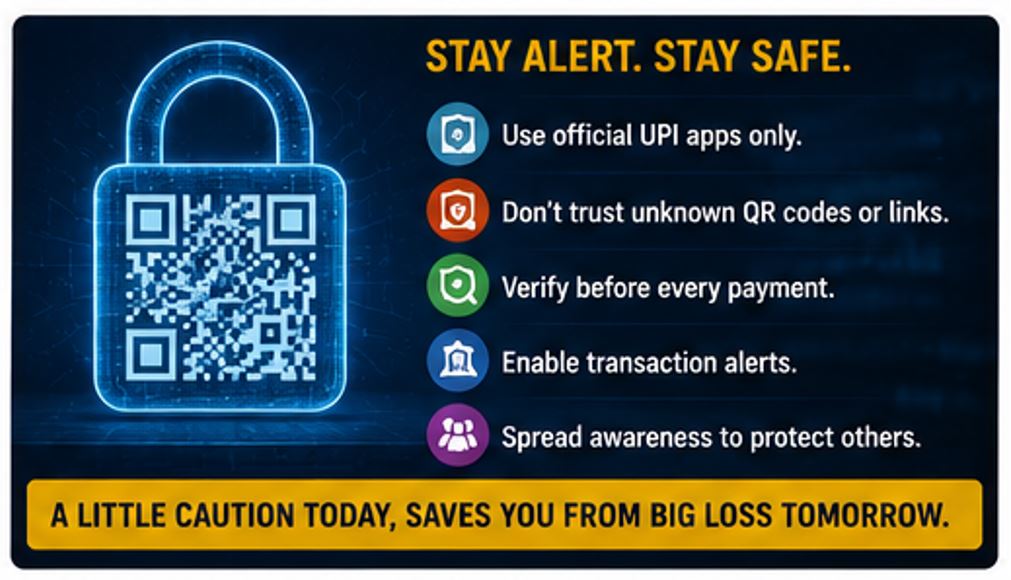
Aslireview_StayAlertStaySafe
Been cheated by a vendor?
Report it on AsliReview and help protect others from the same fraud.