Part 7: Fake Customer Care Scam in India (2026): How Fraudsters Impersonate Banks, Brands & Support Teams
By AsliReview Team · 17 August 2026
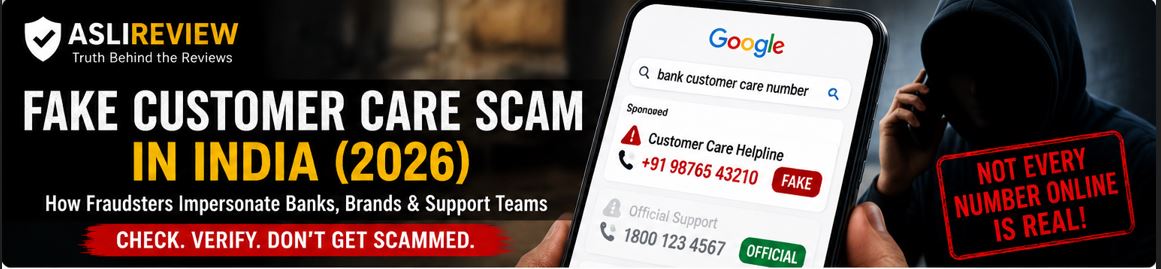
Imagine your online payment fails. You need help quickly. So you search: "Bank customer care number," "UPI customer care number," or "Company refund helpline."
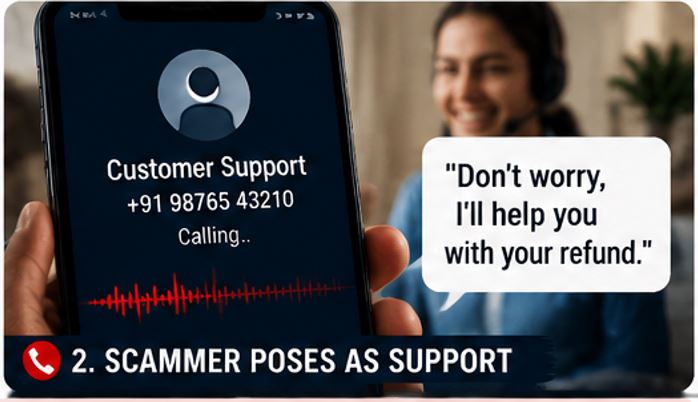
You find a phone number. It looks legitimate. You call. The person answering sounds professional and knows exactly what problem you are talking about.
Then they say: "Don't worry. I'll help you process the refund."
A few minutes later, they ask you to install an application, share a verification code, scan a QR code or approve a payment.
That's when a simple customer-support problem can turn into a financial fraud. This is the fake customer care scam.
Aslireview_FakeCustomerSupport
The Indian Cyber Crime Coordination Centre (I4C) has warned that criminals exploit people's habit of searching online for customer-care numbers. Its advisory describes fraudsters pushing fake numbers through search engines, altering business information on platforms such as Google Maps, and monitoring social-media complaints so they can respond with fraudulent contact details.
And this isn't just an old-fashioned phone scam. Modern versions can involve:
Search results
Fake websites
Social media
Messaging apps
Fake business listings
Fake customer-support profiles
QR codes
UPI requests
Remote-access applications
Google's current Search spam guidance specifically identifies deceptive websites that impersonate legitimate businesses or services and provide fake customer-support information as examples of scam and fraudulent content.
🚨 Fraud Snapshot
Category
Impersonation & Financial Fraud
Risk Level
🔴 Very High
Common Targets
Bank customers, online shoppers, UPI users, travellers, telecom users and small businesses
Common Channels
Search engines, websites, Google Maps, social media, WhatsApp and phone calls
Common Tactics
Fake numbers, fake support accounts, refund scams, OTP theft, QR codes and remote-access apps
Difficulty to Identify
Medium to High
Potential Loss
From a small service payment to substantial financial loss
Best Protection
Find support through the company's official website or official app
What Is a Fake Customer Care Scam?
A fake customer-care scam is a fraud in which someone pretends to represent a genuine company, bank, payment service, marketplace, courier, airline, telecom operator or other organization.
The scammer may provide a fake:
Phone number
Website
Email address
Social-media account
WhatsApp number
Customer-support profile
Business listing
The victim contacts the fake support channel believing it is genuine. The scammer then uses the conversation to obtain money, credentials, personal information or access to the victim's device.
Why Do These Scams Work So Well?
The scam starts when you are already looking for help. That's important. You aren't expecting a scam — you're expecting customer service. You may already be frustrated because your payment failed, your order hasn't arrived, your refund is delayed, your card isn't working, your account is locked, your flight has changed, or your SIM isn't working.
The scammer simply steps into that situation pretending to be the person who can solve your problem. That makes the fraud much more convincing.
How Does a Fake Customer Care Scam Work?
Step 1: You Have a Problem
For example: "My ₹15,000 payment was deducted but the order failed." You need support.
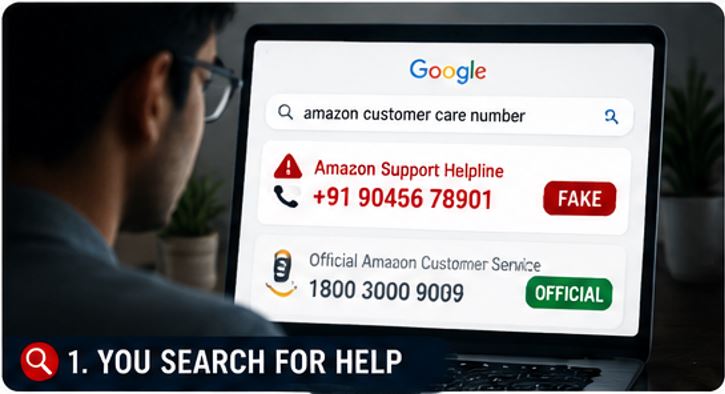
Step 2: You Search Online
You search something like "XYZ customer care number." A phone number appears. You assume it belongs to XYZ. But you haven't verified it.
Step 3: You Call the Number
Someone answers professionally. They may even say "Welcome to XYZ customer support. How can I help you?" That doesn't prove anything.
Step 4: They Ask for Information
They may request your name, phone number, order number, account information, card details, OTP, or UPI information. Some of these details may seem reasonable because genuine customer support sometimes needs account information. The problem is what happens next.
Step 5: They Create a Fake Solution
The scammer may say "I'll process the refund," "Your account needs verification," or "We need to reverse the failed transaction." Then comes the dangerous instruction.
Step 6: They Ask You to Do Something
You may be asked to install an app, share an OTP, approve a UPI request, scan a QR code, transfer money, share your screen, click a link, or enter your card details. The original customer-support problem has now become a fraud.
What Happened? An Illustrative Example
Let's imagine a common situation. Priya orders a ₹12,000 appliance online. The payment is deducted, but the order doesn't appear correctly in her account. She searches Google for "Brand customer care number" and finds a number on a website that looks like a support page.
She calls. The person says "Your payment is stuck. We can process the refund." Priya is asked to install a remote-support application. The caller then asks her to open her banking application. A few minutes later, Priya notices that money has been transferred from her account. The "customer-care executive" disconnects the call. The website she used later disappears.
What went wrong? The biggest mistake wasn't calling customer support. It was trusting an unverified support channel.
⚠️ Warning Signs to Watch For
Aslireview_RedFlag
1. The Number Came From an Unverified Website
If you found the number on an unrelated website, forum, comment or social-media post, don't assume it is genuine. The I4C has specifically warned about fake customer-care numbers being promoted through search engines and social-media channels.
2. The "Executive" Asks for Your OTP
An OTP is designed to authenticate an action. If someone asks you to read out a verification code over the phone, stop and verify what the code is authorizing. Never assume that because someone says they're customer support, they are entitled to your OTP.
3. They Ask for Your UPI PIN
This is a major red flag. Your UPI PIN should remain private. A customer-care representative should not need it to "process a refund." NPCI warns users against sharing UPI PINs and other sensitive payment information.
4. They Send a QR Code for a Refund
This is another classic trap. The caller says "Scan this QR code to receive your refund." But the QR code may initiate a payment. This connects directly with the QR-code fraud pattern covered in our previous AsliReview guide on QR code scams.
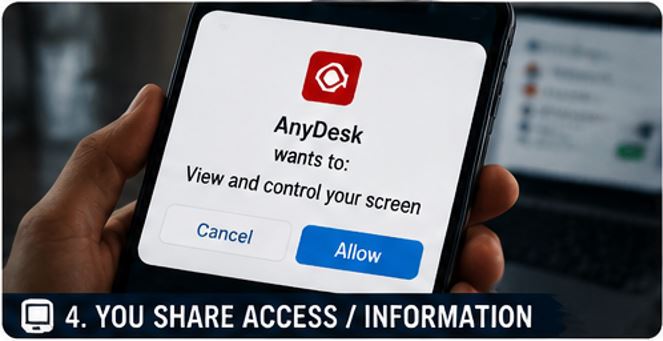
5. They Ask You to Install a Remote-Access App
This is particularly dangerous. The scammer may claim "I need access to your screen to fix the problem." Once you provide remote access, the person may be able to see sensitive information or manipulate what you're doing. If customer support unexpectedly asks you to install remote-control software, stop.
Aslireview_Anydesk
6. They Create Urgency
Watch out for phrases like "do it immediately," "your account will be blocked," "the refund expires today," "your payment will be lost," or "your card will be cancelled." Scammers use urgency to stop victims from independently verifying the story. Google's current scam guidance similarly recommends slowing down, checking the details independently and refusing demands for immediate payment or personal information.
7. They Ask You to Transfer Money to "Fix" the Problem
Be especially careful if someone says "Transfer ₹10,000 temporarily and we'll reverse it." The I4C advisory specifically describes fake support operators telling victims to transfer funds to resolve supposed account, card or loan issues.
Common Types of Fake Customer Care Scams
1. Fake Bank Customer Care
You search for your bank's support number. The scammer pretends to be a bank representative, claiming your account is blocked, your KYC has expired, your card has been compromised, or a transaction needs verification. They then request sensitive information or payment.
💡 AsliReview Tip
Find your bank's customer-care number from the back of your card, your bank's official website, or your official banking application. Don't rely on a random search result.
2. Fake UPI Customer Care
This scam targets people who have failed transactions, pending refunds, UPI payment issues, or merchant disputes. The fake support agent may ask you to share an OTP, approve a collect request, scan a QR code, install an app, or transfer money.
You don't need to trust an unknown caller simply because they know your transaction amount. Open your UPI app and use its official support mechanism where available.
3. Fake E-Commerce Customer Care
Online shoppers are common targets. The scam may begin with "My order hasn't arrived" or "I need to cancel my order." The victim searches for support, the scammer offers to process the refund, and then the fraud begins.
Common targets include shopping websites, food delivery, electronics retailers, travel websites, furniture stores, and online marketplaces.
4. Fake Courier Customer Care
You receive a message or call about a parcel. You search for the courier company's number. A fake support representative says "Your parcel has been held," and may ask for personal details, payment, OTP, ID information, or app installation. Some courier scams can also escalate into impersonation or "digital arrest" fraud.
5. Fake Airline or Travel Support
Travel problems can create a perfect opportunity for scammers. You may be dealing with cancelled flights, booking problems, refund delays, or hotel cancellations. The fraudster offers to "fix" the issue, then requests payment or sensitive information.
Use the airline, hotel or travel platform's official website or application. Don't rely on numbers found through random posts.
6. Fake Telecom Customer Care
A scammer may claim "Your SIM will stop working" or "Your KYC needs updating." The victim is then asked to share OTPs, install an application, provide identity information, or pay a small fee. Never provide sensitive information merely because someone claims to represent your telecom provider.
Aslireview_ScammerSupport
7. Fake Google or Technology Support
Technology brands are also impersonated. Scammers may claim "Your account has been hacked," "Your device has a virus," or "Your account needs verification." Google currently warns users about impersonation scams and says people should slow down, independently check claims and avoid sharing sensitive information or making payments under pressure. For Google Pay India specifically, Google provides official support through its help channels and warns users about suspicious calls and requests.
8. Fake Social-Media Customer Support
This is particularly interesting. You post publicly: "@BrandName My order hasn't arrived. Please help!" A fake support account notices your post and replies "Please DM us your order details." The account may look almost identical to the real company. Then you receive a private message containing a phone number. You call. The scam begins.
The I4C has specifically warned that criminals monitor consumer complaints posted on social media and use them to provide fraudulent contact details.
❌ Common Mistakes People Make
Calling the first number in search results — search engines are useful, but you should not assume every phone number displayed on a page is an official customer-care number
Trusting a professional voice — a scammer can sound exactly like a customer-service employee; professional communication is not proof of identity
Assuming caller ID is proof — caller ID can be misleading or manipulated; verify independently
Sharing an OTP because "support needs it" — understand what the OTP is authorizing before entering or sharing any code
Installing software because support asked — never give a stranger control over your device simply because they claim to be customer support
Searching for support only through social media — social media can be useful for contacting companies, but verify that the account is actually official
Staying on the call because you're afraid of losing money — this is exactly what the scammer wants; if you're uncomfortable, hang up, you can always call the company back through an independently verified channel
🔍 How to Find the Real Customer Care Number
Aslireview_FindRealCustomerCare
This is probably the most important section of the article.
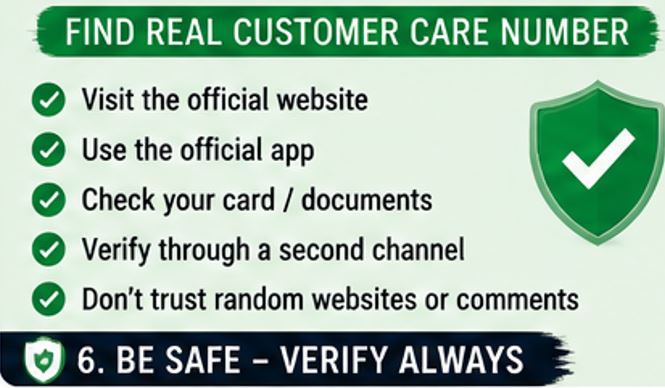
Method 1: Use the Company's Official Website
Don't search "Company customer care number" and immediately call the first number you see. Instead, find the company's official website, type the website address yourself when possible, open the official support/contact section, and use the number or support channel listed there.
Method 2: Use the Official App
If you already have the company's official application, open it, go to Help/Support, and use the support option provided inside the app. This can be safer than searching for a number externally.
Method 3: Check Your Original Documents
For banks and financial services, check your card, account documents, official statements, verified emails, and official SMS messages.
Method 4: Verify Through a Second Channel
If someone contacts you claiming to be customer support, don't continue the conversation through the same channel. Instead, visit the official website, call the official number, or use the official app. If the information doesn't match, stop.
🛑 The Two-Channel Verification Rule
AsliReview recommends a simple rule: never verify a support contact using the same source that introduced you to it.
For example, you receive a WhatsApp message saying "Call this number for your refund." Don't verify that number by asking the same WhatsApp contact. Instead, independently visit the company's official website. This breaks the scammer's chain of control.
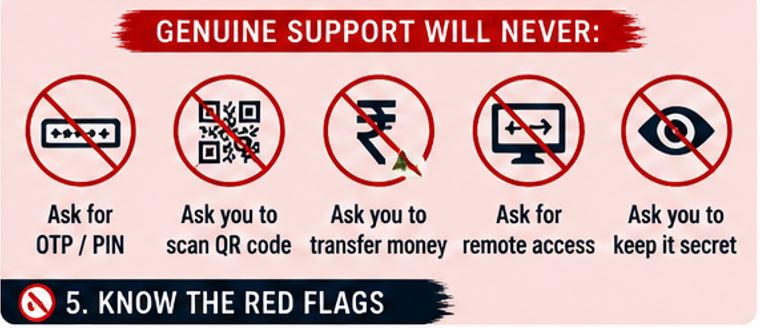
What Should Genuine Customer Support Never Ask You to Do?
Be extremely cautious if an unsolicited "support agent" asks you to:
Share your UPI PIN
Share your ATM PIN
Share your password
Read out an OTP
Transfer money to a personal account
Scan a QR code to receive a refund
Install unknown remote-access software
Share your entire screen
Disable security features
Keep the conversation secret
The exact procedures differ between companies and services, so the safest approach is to independently verify the request through an official channel.
📌 Reality Check
Myth: If the number appears on Google, it must be official.
Reality: Search engines index information from many sources. A fraudulent website or listing can attempt to present itself as an official support channel. India's I4C has specifically warned about fake customer-care numbers being promoted through search engines and other online platforms. Google's own current spam policy also identifies fake customer-support websites and contact information as examples of scam/fraud content.
📌 Reality Check
Myth: The person knows my order number, so they must be genuine.
Reality: Scammers can obtain personal or transaction-related information from many sources. Knowing one piece of information does not prove identity. Verify through an independent channel.
📌 Reality Check
Myth: Customer support needs remote access to fix my problem.
Reality: An unsolicited caller should not automatically be trusted with control of your device. If someone asks for remote access, stop and verify the request through the company's official support channel first.
💡 AsliReview Tip — Never Search for Help in a Hurry
When something goes wrong, your first instinct is often "I need the customer-care number right now." That's exactly when you are most vulnerable. Instead, make this your default path: official website → official app → official support.
What If You Already Gave Information to a Fake Customer-Care Agent?
Don't panic. What you should do depends on what you shared.
If you shared an OTP — review the account or transaction associated with that OTP immediately. If you notice an unauthorized transaction or account change, contact the relevant service provider and your bank immediately.
If you shared banking information — contact your bank, ask what security measures are appropriate for your account, and review recent transactions.
If you shared your UPI PIN — contact your bank/payment provider immediately and change or reset the PIN using the official application or process. Review recent transactions.
If you installed a suspicious application — stop interacting with the caller. Disconnect the device from the internet if appropriate, remove the suspicious application if you can do so safely, and secure important accounts from a trusted device if necessary. If financial information may have been exposed, contact your bank immediately.
If Money Has Already Been Lost
Act immediately.
Step 1: Contact Your Bank
Tell the bank about the fraudulent transaction.
Step 2: Call 1930
India's National Cyber Crime Reporting Portal identifies 1930 as the national helpline for immediate reporting of financial cyber fraud.
Step 3: Report Online
Use the National Cyber Crime Reporting Portal. The portal also provides a facility for reporting suspicious phone numbers, WhatsApp numbers, Telegram handles, email IDs, URLs and other cybercrime identifiers.
Step 4: Preserve Evidence
Keep the phone number, website URL, screenshots, call logs, WhatsApp conversations, SMS, email, transaction ID, UPI ID, bank notification, and payment details. Don't delete the conversation.
🛡 Quick Safety Checklist
Before contacting customer support:
Am I using the company's official website or app?
Did I independently verify the phone number?
Is this the official social-media account?
Am I being pressured to act immediately?
Is someone asking for an OTP?
Is someone asking for my UPI PIN?
Am I being asked to transfer money?
Am I being asked to scan a QR code?
Am I being asked to install remote-access software?
Can I hang up and contact the company independently?
If the answer to any of the last five questions is yes, stop and verify before continuing.
The 30-Second Customer Care Verification Test
Before trusting a support number, take 30 seconds.
Check 1 — Source: Where did I get this number? Official website? Official app? Random search result? Social media comment? Unknown website?
Check 2 — Identity: Can I independently confirm this number belongs to the company?
Check 3 — Request: What exactly is the person asking me to do?
Check 4 — Payment: Am I being asked to send money?
Check 5 — Credentials: Am I being asked for an OTP, PIN or password?
If something doesn't make sense, hang up. You can always call back using a verified number.
Frequently Asked Questions
How do I know if a customer-care number is genuine?
The safest approach is to obtain the number directly from the company's official website, official application, bank card or verified documentation. Don't rely solely on a random search result, social-media comment or third-party website.
Can scammers put fake customer-care numbers on Google?
India's I4C has warned that fraudsters have used search engines to promote fake customer-care numbers and have also targeted online business listings and social-media channels. Google also explicitly identifies fake customer-support sites and deceptive contact information as examples of scam/fraud content in its Search spam policies.
Is the first customer-care number on Google safe?
Not necessarily. Treat search results as a starting point, not proof that a phone number is official. Verify the number through the company's official website or application.
Can a fake customer-care agent steal money from my bank account?
A fraudster may attempt to trick you into authorizing a transaction, sharing credentials or installing software that compromises your information. The scam often depends on social engineering rather than directly "hacking" your bank account.
Should I give customer support my OTP?
Don't automatically share an OTP simply because someone claims to be customer support. Understand what the OTP is authorizing and verify the request through an official channel. Never disclose your UPI PIN, ATM PIN or banking password to an unsolicited caller.
Can customer support ask me to install AnyDesk or another remote-access app?
Treat an unsolicited request for remote access as a major warning sign. Don't install remote-access software simply because a caller claims to be customer support. Verify the issue through the company's official support channel first.
Can a customer-care agent ask me to scan a QR code for a refund?
Be extremely cautious. A QR code can initiate a payment, and entering your UPI PIN can authorize money to leave your account. If someone claims that scanning a QR code is necessary to receive a refund, independently verify the request before doing anything.
What should I do if I called a fake customer-care number?
Stop communicating with the person. If you shared sensitive information, contact the relevant service provider or bank and secure your accounts. If money was lost through cyber fraud, call 1930 and report the incident through the National Cyber Crime Reporting Portal.
What if I only gave the scammer my phone number and order number?
Don't panic, but remain alert. Monitor your account and communications for suspicious activity. Be particularly careful if you receive follow-up calls claiming to be customer support.
Where can I report a fake customer-care number?
The National Cyber Crime Reporting Portal provides a facility to report suspicious identifiers such as phone numbers, WhatsApp numbers, Telegram handles, websites, email IDs and social-media URLs. If financial fraud has already occurred, report it immediately through 1930 and the cybercrime portal.
Aslireview_Footer
Been cheated by a vendor?
Report it on AsliReview and help protect others from the same fraud.