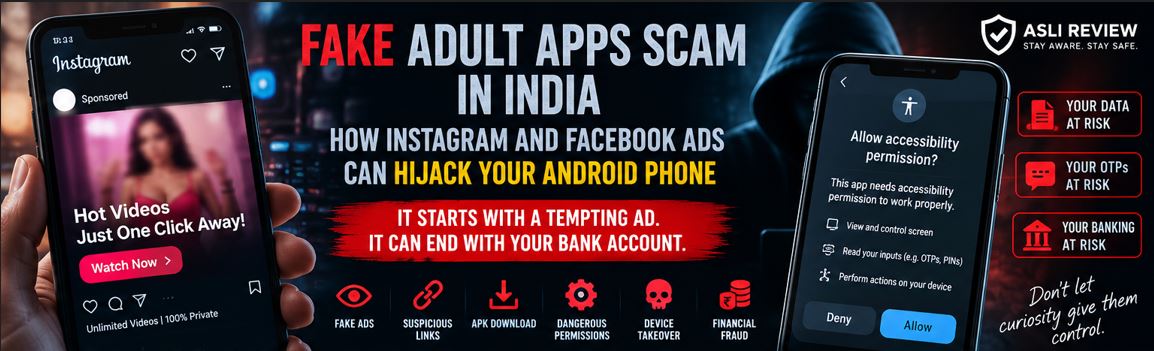
Fake Adult Apps Scam in India: How Instagram and Facebook Ads Can Hijack Your Android Phone
By AsliReview Team · 7 September 2026
Imagine scrolling through Instagram or Facebook. You see an advertisement promising access to adult content. You click. Instead of taking you directly to legitimate content, the advertisement sends you to another website.
The website then tells you: "Download this app to watch the video." You download an APK. The app opens. Then it asks for something that seems unrelated to watching a video: Accessibility permission.
You might think "I'll just allow it so the app works." That could be the moment the situation changes completely.
According to the Indian Cyber Crime Coordination Centre (I4C), a growing fraud pattern involves malicious Android applications disguised as pornography apps and promoted through advertisements on Facebook and Instagram. The apps can abuse Accessibility permissions to take control of the device and potentially facilitate financial fraud.
🚨 Fraud Snapshot
Threat
Malicious Android applications disguised as adult-content apps
Night Play, Reloop, Kyss, Vimo, Rivo, Nexo, Vixa and variants
Official warning
Indian Cyber Crime Coordination Centre (I4C)
Advisory
TAU/ADV/018, issued 26 August 2026
This Is Not Really About Adult Content
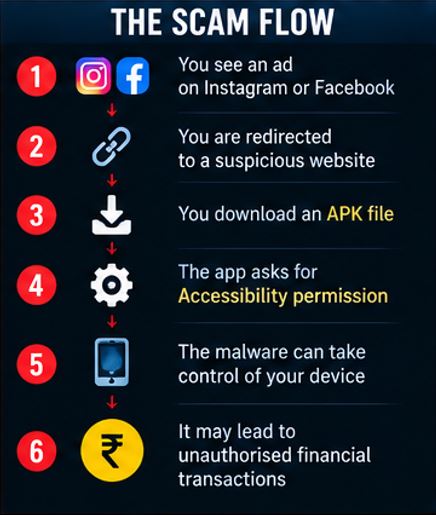
The adult content is simply the bait. The real objective is the phone. That's an important distinction — the scammer isn't necessarily interested in showing you a video. The advertisement is being used to move you through a sequence: social-media ad → suspicious website → APK download → app installation → permission request → Accessibility access → device control → potential financial fraud.
I4C's advisory describes this progression as a multi-stage attack chain.
The Apps Identified by I4C
The I4C warning specifically identified several malicious applications and variants, including Night Play, Reloop, Kyss, Vimo, Rivo, Nexo, and Vixa. The warning covers these names and similar variants, so consumers should not assume an app is safe simply because it doesn't use one of these exact names.
The broader warning is about the method: social-media advertisement → suspicious website → APK → dangerous permissions.
How the Scam Works
Aslireview_FakeAdultAppScam_ScamFlow
Step 1: The Advertisement
The first contact may happen on a platform you already use every day. According to I4C, the malicious applications were being promoted through advertisements on Facebook and Instagram.
This matters because users often assume "if it's an advertisement on a major platform, it must have been checked." That's not a safe assumption — a social-media advertisement is not a guarantee that the destination website or application is trustworthy.
Step 2: You Are Redirected to a Website
After clicking the advertisement, you may be taken to a website offering adult content. Reports on the I4C advisory say many of the identified sites used suspicious domains, including .live domains. The website then creates a reason for you to install an application — "install our app to continue," "download the player," or "update the application to watch." This is where the trap moves from browser activity to device compromise.
Step 3: The APK Download
An APK is the installation package used by Android applications. Android allows applications to be installed outside the Google Play Store under certain circumstances — that capability has legitimate uses, but it also creates an opportunity for criminals to distribute malicious software directly.
The I4C warning specifically advises users not to download APK files from advertisements, websites or suspicious links. The red flag is not simply "APK" — the bigger problem is an unknown website asking you to install an APK for something you don't actually know or trust.
Step 4: The App Asks for Permissions
After installation, the application may request sensitive permissions. One of the most important in this campaign is Accessibility access.
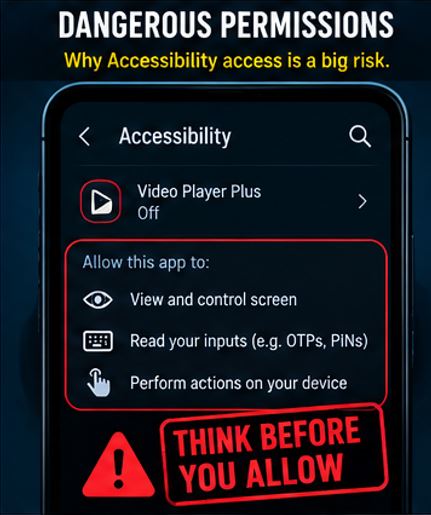
Android Accessibility features exist for legitimate reasons — they help people interact with their devices in different ways. But granting Accessibility access to an untrusted application can give that application powerful capabilities. According to reporting on the I4C advisory, abused Accessibility permissions can allow malicious software to read information on the screen, interact with interface elements and potentially enter information such as OTPs and PINs.
Why Accessibility Permission Is So Dangerous
Imagine your banking app is open. You enter your PIN. You receive an OTP. You see the transaction confirmation. A malicious application with excessive control over your device may potentially be able to observe or interact with what is happening on the screen.
The danger is therefore not simply "the app can see my photos." It can potentially become "the app can interact with my phone while I am using it." That is a much more serious threat.
Step 5: The Malware May Download Another Application
According to the I4C advisory, some versions of the malware can download a secondary package while pretending that it is an update to the original application. This is clever because users are accustomed to seeing "update available" as something harmless. But if the original application was malicious in the first place, an "update" can simply be another component of the attack.
Step 6: Some Variants May Install a VPN
The I4C warning also says some variants may install a VPN and route the victim's internet traffic through attacker-controlled infrastructure. A VPN itself is not malicious — millions of people legitimately use VPN services. The concern here is who controls the VPN and why it is being installed. If an unknown application silently establishes such a connection, your internet traffic and online activity could potentially be exposed to misuse.
Step 7: The Phone Can Potentially Become a Fraud Tool
Once the malware has sufficient access, the objective can move beyond data theft. The I4C warning says that such device takeover can potentially result in unauthorised financial transactions. That is the point where a seemingly embarrassing click can become a serious financial-security incident.
The Six-Stage Attack Chain
The entire operation can be simplified into six stages:
Social-media advertisement — a misleading advertisement appears on Facebook or Instagram
Phishing website — the user is redirected to a website offering the promised content
APK installation — the website persuades the user to install an application outside the official app store
Accessibility abuse — the application requests powerful permissions
Device takeover — the malware operates in the background and may gain control over device functions
Financial fraud — the compromised device can potentially be used to facilitate unauthorised transactions
This attack chain is consistent with the mechanism described in the I4C advisory.
Why Social-Media Advertisements Make This Dangerous
There is an important psychological element here. People don't usually wake up thinking "today I will install malware." They think "I'm just clicking an Instagram ad." That distinction matters — the attack begins before the malware is installed. The social-media advertisement is the first part of the attack.
The "Official Platform" Illusion
One of the most dangerous assumptions is "Facebook/Instagram wouldn't allow a dangerous advertisement." Unfortunately, no advertising platform can guarantee that every advertisement and every destination will always be safe.
This incident illustrates the gap clearly. India's cybercrime coordination centre issued its warning on 26 August 2026. According to reporting, Reuters found dozens of these malicious ads still running five days later, and Meta removed them only after Reuters asked about them directly — not proactively as a result of the government advisory itself. The lesson: an advertisement appearing on a major platform does not make the destination trustworthy, and platform enforcement can lag well behind an official warning.
The APK Trap
There is a very simple rule every Android user should remember: if a random website tells you to install an APK, stop. Especially when the reason is to watch a video, unlock content, verify your age, update your player, remove restrictions, claim a reward, access a private video, activate a subscription, or fix a browser problem.
There may be legitimate situations involving APK installation, but ordinary consumers should not casually install APKs from unknown websites.
The Accessibility Permission Trap
Here's another rule: if an unfamiliar entertainment app asks for Accessibility access, don't grant it. Ask yourself: why would a video player need control over my phone? It shouldn't need broad control of your device simply to play content. This is the kind of mismatch that should immediately stop the installation.
Warning Signs to Watch For
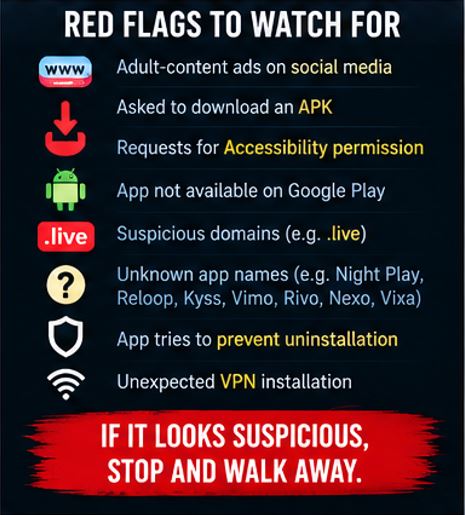
Aslireview_FakeAdultAppScam_RedFlag
Be especially cautious when you see several of these together:
Adult-content advertisement on social media
Unknown website after clicking the advertisement
Request to download an APK
"Install this app to continue" / "Update required"
App downloaded outside Google Play
Request for Accessibility permission
Request to install another application
Unexpected VPN installation
Application tries to prevent uninstallation
Unknown app appears in Settings
Banking/UPI activity changes unexpectedly
One red flag may be explainable. Five red flags together should make you leave immediately.
💡 AsliReview Tip
A video player should not need control of your phone. Whenever an entertainment app asks for powerful permissions, stop and ask: what does this permission have to do with the thing I am trying to do? If the answer doesn't make sense, don't grant it.
What to Do If You Have NOT Installed the App
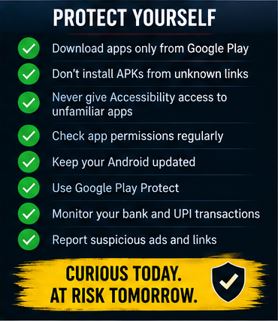
Aslireview_FakeAdultAppScam_ProtectYourSelf
Close the website — don't continue
Don't download the APK — delete the downloaded file if necessary
Report the advertisement — use the reporting tools provided by the social-media platform
Don't revisit the link — even if the advertisement promises something tempting
Use official app stores — download applications through Google Play or another trusted source
What to Do If You Already Installed It
This is more serious. Don't assume "I deleted the icon, so everything is fine" — malicious applications may install additional components or resist normal removal. I4C has specifically warned that some of these applications may make uninstallation more difficult.
Step 1: Disconnect If Necessary
If you suspect your phone is actively compromised, consider temporarily disconnecting it from the internet while you assess the situation. This can reduce ongoing network communication while you work on removing the threat.
Step 2: Check Accessibility Permissions
Go into your Android settings and review which applications have Accessibility access. The exact menu name can vary by Android manufacturer. Look for unfamiliar applications — if an unknown app has Accessibility access, revoke it.
Step 3: Check Device Administrator Access
Also check whether the suspicious application has been granted device-administrator privileges. If it has, remove those privileges. Only then attempt to uninstall the application.
Step 4: Remove Suspicious Applications
Look through your installed apps. Pay attention to recently installed apps, apps you don't remember installing, apps with generic names, apps without recognisable publishers, and apps installed immediately before the suspicious activity. Remove anything clearly associated with the incident.
Step 5: Use Safe Mode If the App Refuses to Uninstall
I4C's guidance says that if a suspicious application cannot be removed normally, users can restart the Android device in Safe Mode and then uninstall the application. The exact Safe Mode procedure varies by device manufacturer.
Step 6: Check Your Bank and UPI Accounts
Immediately review bank transactions, UPI transactions, card transactions, wallet transactions, SMS alerts, and email alerts. Look for anything you don't recognise. Do not wait until the end of the month to check your statement.
Step 7: Change Important Passwords From a Safe Device
If you believe your device was compromised, consider changing important passwords using a different trusted device. Prioritise email, banking-related accounts, payment services, social media, and cloud storage. Where possible, enable multi-factor authentication.
Step 8: Contact Your Bank Immediately If Money Moved
If an unauthorised financial transaction has occurred, act immediately. Contact your bank/payment provider and report the transaction. For financial cyber fraud in India, the official cybercrime system provides the 1930 helpline. You can also report the incident through the National Cyber Crime Reporting Portal. The portal's Report Suspect facility also allows citizens to report suspicious identifiers such as websites, WhatsApp numbers, Telegram handles, phone numbers and social-media URLs.
Step 9: Consider a Factory Reset
If the malicious application cannot be removed, returns after removal, continues behaving suspiciously, or you cannot establish that the device is clean, I4C guidance recommends backing up important data and considering a factory reset as a last resort. A factory reset is disruptive, so it should not be the first reaction to every suspicious app — but when a device appears persistently compromised, it can be an important recovery option.
What NOT to Do
Never download APKs from random websites. Never install an app because an Instagram/Facebook ad tells you to. Never grant Accessibility access to an unfamiliar app. Never give an entertainment app unnecessary permissions. Never ignore an unknown VPN installation. Never assume deleting an icon removes malware. Never continue using banking apps on a device you strongly suspect is compromised. Never ignore unexplained bank or UPI transactions.
📌 Reality Check
Myth: If the advertisement is on Instagram, it must be safe.
Reality: Advertisements can lead users to malicious websites or applications. Recent reporting shows Meta removed deceptive ads after India's warning about this campaign — though only after being directly questioned by journalists, days after the government's initial advisory.
📌 Reality Check
Myth: APK files are always viruses.
Reality: APKs are legitimate Android application packages. The danger is installing an APK from an untrusted source or in response to a suspicious advertisement.
📌 Reality Check
Myth: Accessibility permission is harmless.
Reality: Accessibility has legitimate uses, but granting powerful Accessibility access to malicious software can enable serious device abuse. I4C specifically warned about this threat.
📌 Reality Check
Myth: I deleted the app, so my phone is clean.
Reality: Some malicious applications may install additional components or resist normal uninstallation. A deeper security check may be necessary.
📌 Reality Check
Myth: Only people who use banking apps are at risk.
Reality: A compromised device can expose personal information and authentication data even if you don't regularly use mobile banking.
📌 Reality Check
Myth: Private browsing will protect me.
Reality: Private/incognito browsing does not make a malicious application safe. Once malware is installed and granted powerful permissions, the problem is at the device level.
The AsliReview 5-Second APK Test
Before installing an application from a link:
STOP — who sent me this link?
CHECK — am I downloading from an official app store?
QUESTION — why does this app need these permissions?
THINK — would I install this app if there were no tempting content behind it?
EXIT — if anything doesn't make sense, close the page
The AsliReview Permission Rule
Don't judge an app only by what it claims to do — judge it by what it wants access to do. A calculator asking for your contacts? Suspicious. A flashlight asking for your SMS? Suspicious. A video player asking for Accessibility control? Very suspicious. The permission should make sense for the function.
A New Type of Social-Media Scam
We often think of social-media fraud as fake account → fake message → stolen money. This campaign demonstrates a different model: advertisement → malware. The social platform isn't necessarily where the theft occurs — it is the distribution channel. The real attack happens after the victim leaves the platform and installs the malicious software.
Why This Trend Is More Dangerous Than a Normal Phishing Link
A phishing link may try to trick you into entering a username, password, card details, OTP, or UPI information. A malicious application can potentially go much further — if sufficiently privileged, it can operate on the device itself. That means the attacker isn't simply waiting for you to type something into a fake website; the malware may be able to interact with the device while you are using it. That is why this category deserves serious attention.
What Parents Should Tell Teenagers
This warning is particularly important for younger users. Teenagers may be more likely to click viral content, follow social-media advertisements, search for restricted content, download apps from unfamiliar websites, and ignore permission warnings.
The message doesn't need to be complicated: don't install an APK just because a website promises a video, and never give an unknown app Accessibility access. A two-minute conversation can prevent a major security incident.
What Families Should Do Together
Once a month, review installed apps, review Accessibility permissions, review device administrator apps, check banking alerts, check UPI transactions, remove apps nobody recognises, keep Android updated, and keep Google Play Protect enabled. Security doesn't have to be complicated — regular checking beats emergency recovery.
What Businesses Should Know
This threat isn't limited to individual consumers. Employees may use personal Android devices for work email, WhatsApp, banking, business communication, authentication, and cloud services. A compromised personal device can therefore become a gateway to business information. Companies should educate employees about APK sideloading, Accessibility abuse, malicious advertisements, social engineering, mobile malware, and unusual VPN installations.
The Bigger Lesson: The Attack Starts Before the Download
Most people think the attack begins when they install the malicious application. It doesn't — it begins with the advertisement. The attacker first has to convince you to click, then to visit a website, then to download something, then to allow a permission. Each step is designed to feel reasonable. By the time the user reaches the dangerous permission screen, the attacker has already won several small decisions. That's why this is best understood as a social-engineering attack combined with malware.
The AsliReview Action Checklist
If an online advertisement asks you to install an app:
Is the app available on Google Play?
Do I know the developer?
Did I search for the official app independently?
Is the download coming from an unknown website?
Is it an APK?
Does the app ask for Accessibility access?
Does it ask for unusual permissions?
Does it want to install another app?
Does it install a VPN unexpectedly?
Can I uninstall it normally?
Have I checked my bank/UPI transactions?
If several answers are concerning, don't install it.
Frequently Asked Questions
What are the fake adult apps being warned about?
I4C warned about malicious Android applications masquerading as pornography apps and identified names including Night Play, Reloop, Kyss, Vimo, Rivo, Nexo and Vixa, along with similar variants.
How are these apps distributed?
The I4C warning says they are primarily promoted through advertisements on Facebook and Instagram, which can redirect users to suspicious websites and APK downloads.
Why is Accessibility permission dangerous?
Aslireview_FakeAdultAppScam_DangerousPermission
Accessibility features are legitimate Android functionality, but malicious applications can abuse them to interact with the device and potentially observe or manipulate sensitive actions. I4C warned that this abuse can contribute to financial fraud.
Can a malicious app steal an OTP?
According to reporting on the I4C advisory, malware abusing Accessibility permissions may potentially read or interact with information displayed on the screen, including OTPs and PINs.
Is every APK dangerous?
No. APKs are legitimate Android application packages. The danger is installing an APK from an untrusted source or in response to a suspicious advertisement.
What should I do if I installed one of these apps?
Check Accessibility and device-administrator permissions, remove the suspicious application, inspect your bank and UPI transactions, and seek professional/device-security assistance if necessary. If the app cannot be removed normally, I4C guidance includes using Safe Mode and, as a last resort, a factory reset.
What if money has already been stolen?
Contact your bank/payment provider immediately and report financial cyber fraud through 1930 and the National Cyber Crime Reporting Portal.
Can I trust an app just because it is advertised on Instagram or Facebook?
No. A social-media advertisement is not proof that the linked website or application is safe. Reporting on this specific campaign found that dozens of the malicious ads remained live for days after the government's advisory, and were only removed after journalists directly questioned Meta about them.
AsliReview's Bottom Line
The latest Android malware campaign carries a very simple lesson: the dangerous part isn't the video — it's the permission you give the app.
A person may click an advertisement out of curiosity, visit a website, download an APK, and grant one permission because the application says it is required. Within minutes, the situation can move from "I want to watch something" to "someone may now have control over my phone."
I4C's recent warning shows that criminals are increasingly using social-media advertising as the first step in a malware distribution chain, rather than relying only on traditional phishing messages.
The safest approach is remarkably simple: download apps from trusted stores, don't install APKs from random links, never grant Accessibility access to an unfamiliar application, and check your bank and UPI activity regularly.
An attractive advertisement can get you to click. A convincing website can get you to download. A permission prompt can give the attacker control. Don't let one careless tap turn your phone into the attacker's remote control.
Aslireview_FakeAdultAppScam_Footer
Been cheated by a vendor?
Report it on AsliReview and help protect others from the same fraud.